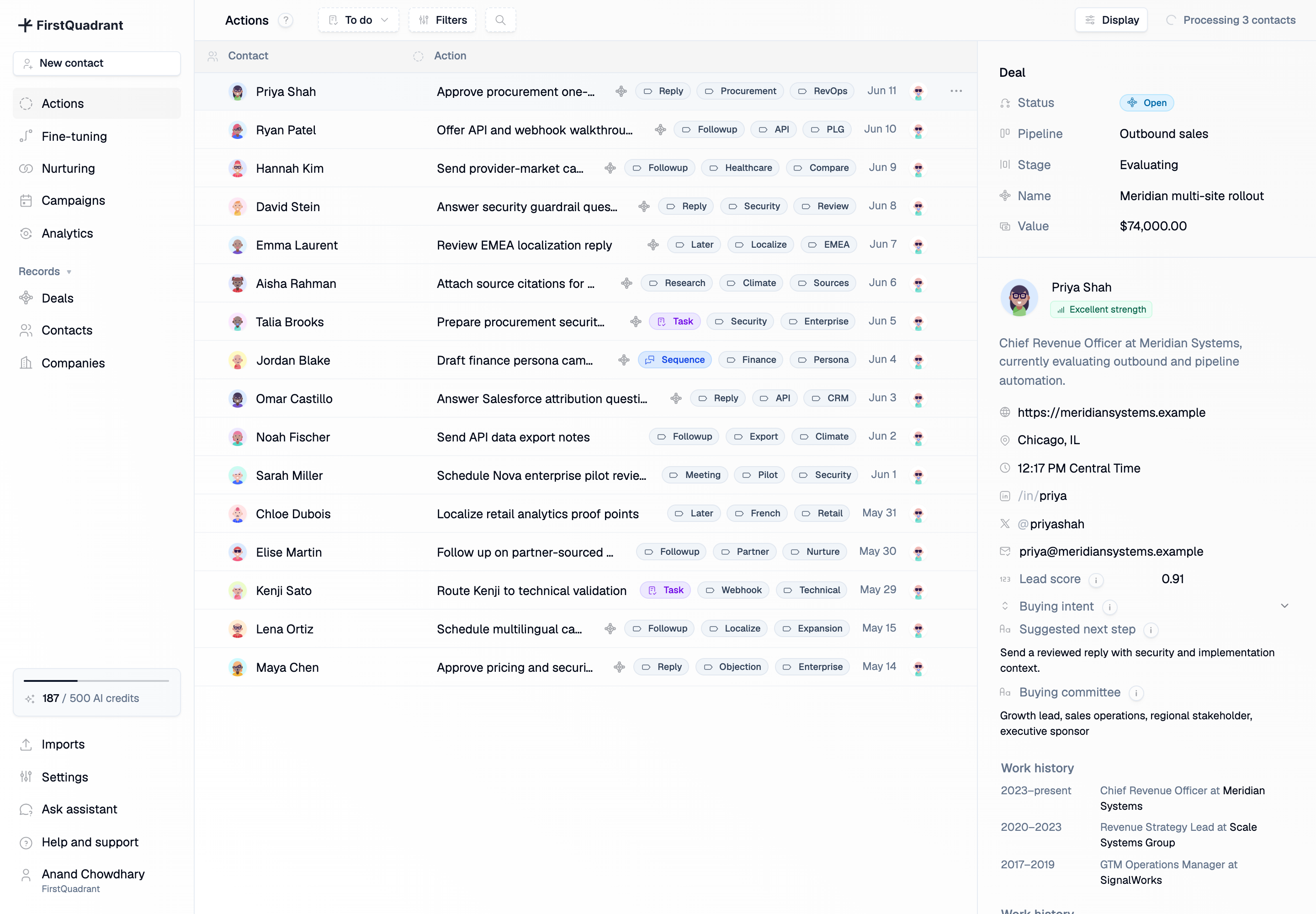
Actions on FirstQuadrant
Actions started from a simple worry: sales AI can be useful and still need a person in the loop. We wanted reps to wake up to a clear queue of suggested next steps, review the context, and decide what was worth sending.

Each row started with something that actually happened: an inbound email, a meeting signal, a stale deal, a campaign response, a note, or an imported lead that was ready for reasoning. FirstQuadrant turned that signal into a proposed next step. Approve a reply. Schedule a follow-up. Research the buying committee. Attach a source citation. Prepare a procurement summary.
The page was intentionally dense. The status selector kept the daily workflow simple: To do, Later, and Done. The table could be filtered by owner, label, contact, company, deal, campaign, sequence status, email verification, location, seniority, and last touchpoint. Selecting a row opened a read-only contact panel with the person, company, enrichment, emails, related deals, and custom properties, so reviewers did not have to jump around the CRM to make a decision.
Behind the queue was Brain, our reasoning system powered by GPT-4o. It read conversation history, contact and company context, pipeline state, campaign context, workspace settings, and fine-tuning rules. When a new signal came in, it did not run a fixed workflow. It looked at the latest context and proposed what should happen next.
Workspace settings were part of that context. The organization profile, website, and description gave Brain basic grounding before it wrote or classified anything for a customer.

The human controls lived right next to the work. You could approve, reject, snooze for a day/week/month, rerun AI reasoning, or sync the action back to the source system. When FirstQuadrant was still processing contacts, the header showed a live “processing contacts” control. That made the background work visible instead of making the list feel mysterious.

Fine-tuning made Brain controllable without turning it into brittle if-this-then-that automation. Teams could create rules for received emails, notes, knowledge, nurturing, and general behavior. A rule could apply everywhere or only to specific campaigns, imports, pipelines, or saved contact views. Email rules doubled as classification labels. Knowledge rules answered recurring questions about pricing or security. General rules shaped tone and writing style.
Autopilot followed that same trust model. When a team trusted a rule, FirstQuadrant could approve generated emails and schedule them automatically. Everything else stayed in the review queue until a person approved it.
That gave teams a gradual path: start manually, learn from edits and rejections, tighten behavior with fine-tuning, then enable autopilot only where the work had become predictable.
Actions was tied into the rest of the CRM. Calendar events could mark meetings as scheduled, email replies could move contacts through campaigns, and deal context could appear directly in the row. The work was bigger than sending an email. It was about moving the relationship forward with the right amount of human review.

The analytics layer made that connection easier to see. Pipeline analytics tracked created deals, won deals, conversion rate, won value, weighted value, and total value, with breakdowns by owner and company. Since actions were tied to contact activity, and contacts could be points of contact on deals, the product could connect an AI-suggested reply to pipeline movement.
Additional product views
The deal pipeline was the other half of the story: Actions handled the daily execution, while deals and analytics made the outcome measurable.
